GB
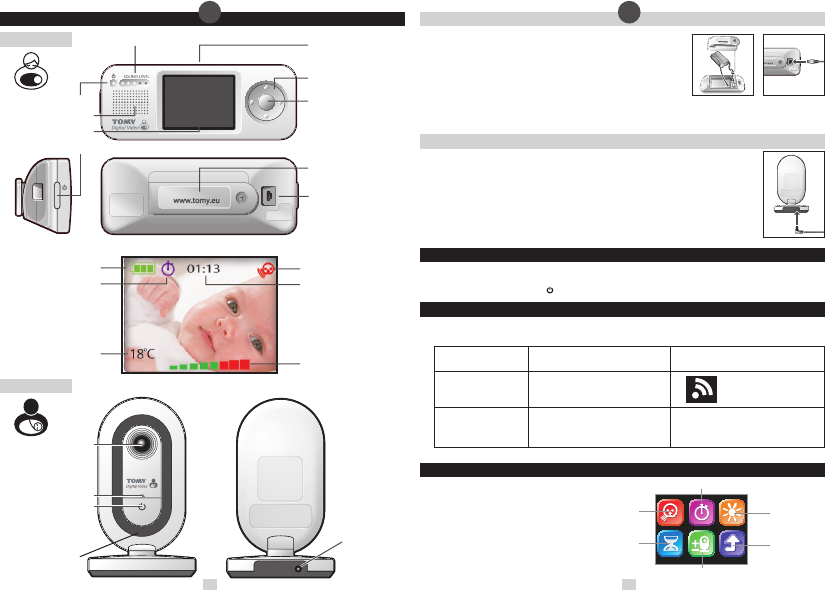
BABY UNIT
• GETTING TO KNOW YOUR MONITOR
PARENT UNIT
Microphone
AC Adaptor Jack
Power Indication Light
Power ON/OFF Button
Quick View Key (Top)
Navigation Key
Mode/Enter Key
Belt Clip/Battery
Compartment Cover
AC Adaptor Jack/
Mini USB Jack
Power Indication Light
Speaker
LCD Display
Power ON/OFF Button
Sound Level Lights Display
Battery Level Indicator
Timer Icon
Temperature Indicator
Sound Activated Monitoring Icon
Timer Display
Volume Indicator
LCD DISPLAY
Camera Lens
Sound Activated
Monitoring
Power Saving Mode
Brightness
RETURN
(to previous screen)
Timer
Add/Remove Baby Unit(s)
2 3
•••
Low Battery on the Parent Unit
Power Indication Light will start to ash.
The battery icon on the LCD screen will
appear empty with a red border.
Alarm tone on
Parent Unit
Alarm Meaning
Indications on the Parent Unit
Out of range
This icon will appear on the
LCD display.
(Continuous)
3 beeps
••••••••
Fig.1 Fig.2
Fig.3
• PARENT UNIT – BATTERY INSERTION & CHARGING
Unscrew the battery compartment cover from the back of the unit (N.B: this
may already be supplied loose). Next, link the plug on the end of the battery
pack connector to the socket inside the unit, pushing the plug rmly into
the socket until it clicks. Place the battery pack into the compartment and
screw the cover back into position. See Figure 1.
Connect the power adaptor with the mini USB-style plug to the Parent Unit.
See Figure 2. Connect the unit into the mains supply and charge for a full
7 hours. You can use your monitor while it is charging by following the ‘SET
UP’ guide below.
Important! Your Parent Unit will not function without rst inserting the battery pack.
• BABY UNIT – MAINS CONNECTION
Connect the power adaptor with the jack head to the back of the Baby Unit. See Figure 3. Connect
the unit to a suitably located mains supply.
Important! Position the Baby Unit at least 1 metre but no more than 3 metres away from your
baby for best performance, ensuring all parts are kept out of reach. Under no circumstances should
you place any parts of the monitor in or on a cot. Keep cot sides and ends at least 40cm from
surrounding bedroom furniture.
The Baby Unit Camera should be positioned to give a complete view of your baby. It may be placed
upright on a at surface pointing towards your baby, or wall mounted above the cot. See ‘Wall
Mounting’ section.
• SET UP
Make sure both Parent and Baby Units are plugged into the mains and/or the Parent Unit is adequately charged. The
units should stand at least 1 metre apart.
Press and hold the ON/OFF Button
on each unit until the green Power Indication Light illuminates.
• ALARM MODES
Identify the cause of an audible alarm by using the following table; should you be unable to identify or rectify the
cause of the problem, please refer to the Simple Solution Guide in these instructions.
• MAIN MENU
Press the Mode/Enter Key to enter the
Parent Unit’s Main Menu screen. Using
the four-directional Navigation Keys,
select one of the menus and press the
Mode/Enter Key to conrm your choice.
Select the Return icon on the screen to go
back to the previous screen
GB






הצטרפו לשיחה על המוצר
כאן תוכל לשתף את מה שאתם חושבים על הTOMY SRV400 Digital Video מוניטור לתינוקות. אם יש לכם שאלה, תחילה קראו בעיון את המדריך. ניתן לבקש מדריך באמצעות טופס יצירת הקשר שלנו.
תשובה | זה היה מועיל (0) (תורגם על ידי Google)