180 mm
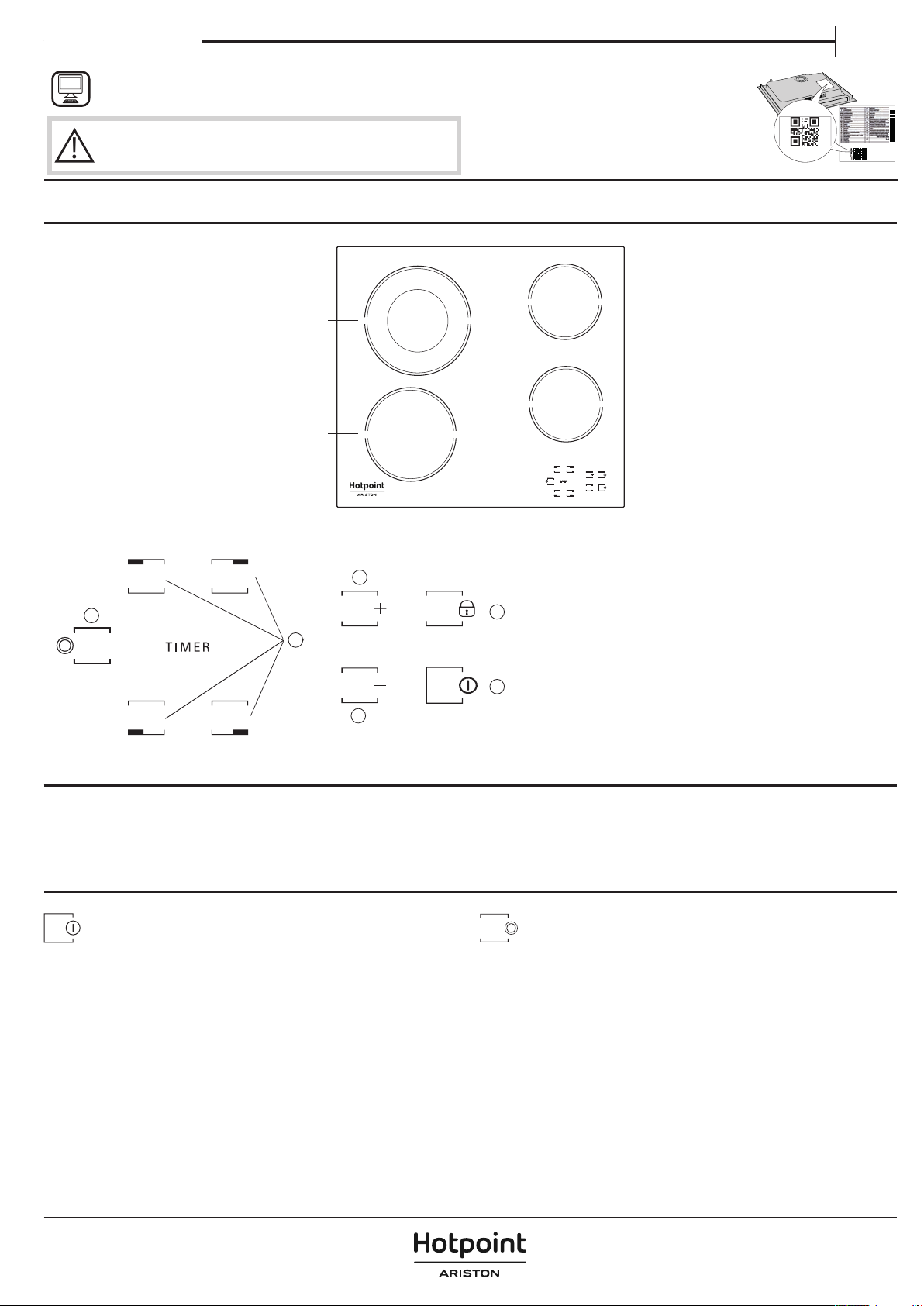
CONTROL PANEL
FIRST TIME USE
Upon the rst installation, the control panel performs a functional test for
about 1 second, after which it automatically switches to the “Key lock“
function.
To deactivate the function, press and hold button “D“; an acoustic signal will
sound, and the corresponding led will turn o.
NOTE: If a reset occurs, repeat the procedure described above.
PRODUCT DESCRIPTION
F
B
E
C
D
A
A On/O
B Cooking zone and timer selection
C-E Heat setting increase and decrease
D Key lock
F
Multiple zone Activation / Deactivation
THANK YOU FOR BUYING A HOTPOINT/ARISTON PRODUCT
In order to receive a more complete assistance, please
register your product on www.hotpoint.eu/register.
PLEASE SCAN THE QR CODE ON
YOUR APPLIANCE IN ORDER TO
REACH MORE INFORMATION
Before using the appliance carefully read the Safety
Instruction.
DAILY USE
SWITCHING THE HOB ON/OFF
To switch the hob on, keep button “A“ pressed for approx. 2 seconds. The
4 cooking zone displays show “0“. If within 20 seconds none of the cooking
zones is activated, the hob switches o automatically as a safety precaution.
SWITCHING ON AND ADJUSTING COOKING ZONES
Press one of the buttons “B“ corresponding to the cooking zone you intend
to use. Select the heat setting required with buttons “E“ or “C“. The other
selectable cooking settings go from 1 to 9. Press buttons “+/−“ at the same
time to cancel all settings.
IMPORTANT: the control is deactivated 10 seconds after the heat setting has
been selected.
To change the heat setting, rst press the selection button “B“ again, then
proceed to change the setting, using buttons “E“ or “C“.
MULTIPLE ZONE
After selecting the desired zone and setting the level (as described in the
previous section) press “F“: an indicator above the button turns on,activating
the additional zone.
The multiple zone can only be used if:
• The cooking zone is provided with multiple zone;
• The power level selected is greater than 0.
To deactivate the multiple zone, press button “B“ of the desired zone, then
press “F“ again.
TIMER
To set the Timer function, select the desired cooking zone and power setting
then press the cooking zone key again and a luminous dot will appear on the
display of the timer-controlled cooking zone. The indication “00“ blinks on the
2 displays. Press buttons “C“ or “E“ to set the time from 1 to 99.
EN
Owner's manual


הצטרפו לשיחה על המוצר
כאן תוכל לשתף את מה שאתם חושבים על הHotpoint HR 632 B כיריים. אם יש לכם שאלה, תחילה קראו בעיון את המדריך. ניתן לבקש מדריך באמצעות טופס יצירת הקשר שלנו.